

Surcharging
Overview
The RBA has announced important changes to card surcharging.The Reserve Bank of Australia (RBA) has announced its intention to ban surcharging on card payments from 1 October 2026. We’re reviewing the RBA’s update and will work through what it means for our customers. We'll share updates, so you know what to expect.
You can read the RBA’s announcement here: Merchant Card Payment Costs and Surcharging
Surcharging is the practice of charging an additional fee to customers who pay with a credit card. This fee is intended to offset the cost of processing credit card transactions. There are restrictions on how surcharging can be implemented, and it is important to understand the rules and regulations that apply to your business.
OnlinePay does not include any surcharge settings by default. If you want to apply a surcharge to credit card transactions, you will need to configure this in the dashboard.
Only Merchant Admin and Merchant Supervisor users have access to set up surcharging in the dashboard.
Card payment surcharge rules
The following information is available on our website.
By default, surcharging is set to 0% for all card transactions. You can set up surcharging in the dashboard to apply a surcharge to credit card transactions up to a maximum of 6% of the transaction amount, provided that it does not exceed the cost of acceptance for that card type.
What's a card surcharge?
- A surcharge is an extra fee that you can pass on to customers to recover the cost of accepting card payments.
- The surcharge applies to payments made by credit or debit cards.
- You can’t charge a customer more than it costs you to process the transaction. Your cost of acceptance is the amount it costs you to process a payment from a particular type of card.
- There are guidelines that have been set by the Reserve Bank of Australia (RBA) on how to apply this surcharge.
What cards does it apply to?
- Mastercard® Debit and Prepaid
- Mastercard Credit
- Visa® Debit and Prepaid
- Visa Credit
- American Express®
- JCB
It doesn't apply to gift cards issued by a store.
How does it work?
- Every year you can review your fees and charges and decide if you want to apply a surcharge for card transactions.
- Your review needs to be completed by September 1 each year.
For information about how to calculate surcharges, FAQs, and other things you should know before applying a surcharge, see Card payment surcharge rules for Merchants.
Set up surcharging in the dashboard
You have two options for applying surcharges to card transactions in the dashboard:
- You can apply a surcharge globally to all applicable card transactions, or,
- You can set up different surcharge rates separately for each scheme.
Applicable surcharge amounts
You can choose to apply a surcharge to amounts within a specific range. For example, you can choose to apply a surcharge only to transactions up to $1000, or only to transactions between $5 and $2000. This allows you to manage the surcharge amounts applied to different transaction sizes. The following example shows a surcharge applicable range between a minimum of $0.01 and a maximum of $1000.00.
Set up global surcharge (optional)
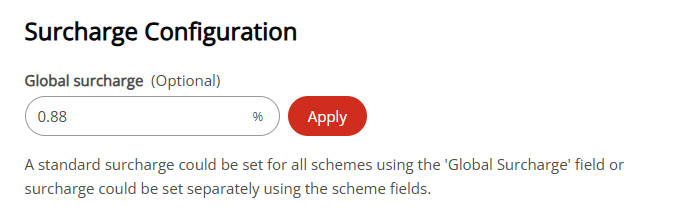
You can configure a global surcharge that applies to all card transactions. The surcharge is calculated as a percentage of the transaction amount and is added to the total amount payable by the customer. The global surcharge is optional and can be set to 0% if you do not want to apply a surcharge to card transactions. It can be used to apply a uniform surcharge across all card transactions, while still allowing you to set up different surcharge rates for specific card schemes if needed.
Where both global and scheme-specific surcharges are configured, the scheme-specific surcharge will take precedence over the global surcharge for transactions made with that card scheme. For example, if you set a global surcharge of
2%and a scheme-specific surcharge of3%for Visa Credit cards, then a3%surcharge will be applied to transactions made with Visa Credit cards, while a2%surcharge will be applied to transactions made with other card schemes.
- In in the OnlinePay dashboard, navigate to Administration > Payment Provider Contracts, then click the Contract Name for the organisation where you want to set up surcharging.
- On the contract settings page, scroll down to the Surcharge Configuration section.
- Set a percentage value in the Global Surcharge field to apply a surcharge to all card transactions. The surcharge percentage you enter will be applied to all applicable card transactions.
- Click Apply to set the global surcharge percentage for all card transactions. This will automatically populate the surcharge percentage for each card scheme with the same value as the global surcharge.
- Click Save to apply the global surcharge settings.
Set up scheme-specific surcharge
Alternatively, you can set up different surcharge rates for each card scheme. Where both global and scheme-specific surcharges are configured, the scheme-specific surcharge will take precedence over the global surcharge for transactions made with that card scheme.
The scheme options available depend on the card types you have enabled on your account.
- In in the OnlinePay dashboard, navigate to Administration > Payment Provider Contracts, then click the Contract Name for the organisation where you want to set up surcharging.
- On the contract settings page, scroll down to the Surcharge Configuration section.
- Set a percentage value in the Surcharge field for each card scheme to apply a surcharge to transactions made with that card scheme. The surcharge percentage you enter will be applied to all applicable transactions for that card scheme.
- Click Save to set the surcharge percentage for each card scheme.
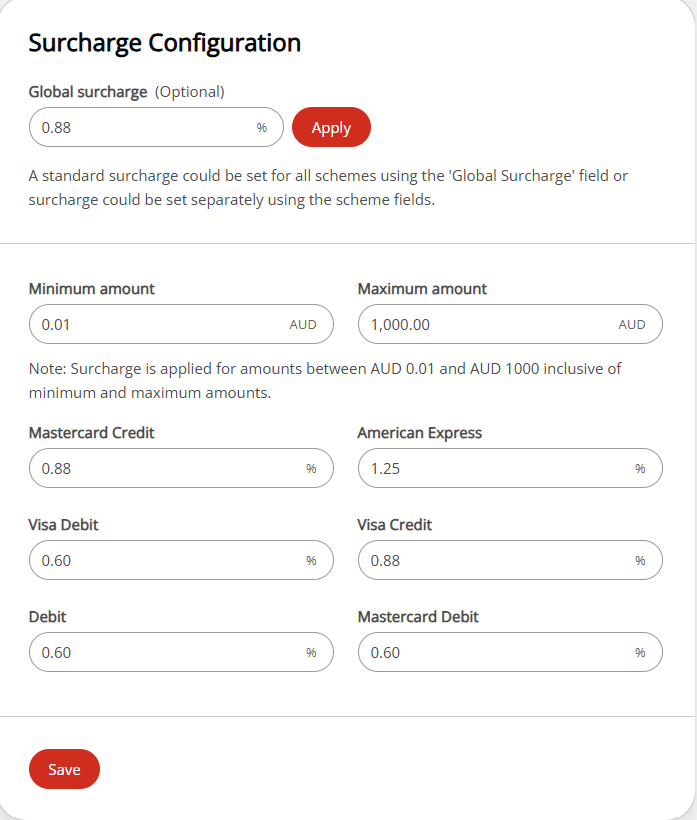
The surcharge values provided in the screenshot above are for illustrative purposes only. You should set the surcharge rates based on your business requirements and in compliance with the card payment surcharge rules.
Surcharge display on payment pages
The surcharge amount is displayed to the customer on the Checkout page, Pay by Link page, and Virtual Terminal, before they complete the payment. The surcharge is calculated as a percentage of the transaction amount and is added to the total amount payable. Surcharges paid are also shown on the transaction receipt.
For card payments, the amount is displayed as a separate line below the total amount shown on the payment button:

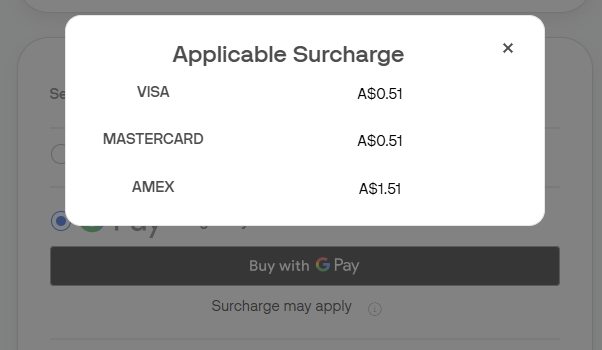
For wallet payments, the surcharge rates are displayed in a pop-up when a customer clicks the Surcharge may apply link below the payment button.
Updated 2 months ago